Running a program is as simple as… okay I know, this seems familiar. So a running program is a process. Our OS runs a process, stops it and runs another, does this forever in order to fool us in having infinite CPUs. For this, the OS has some mechanisms like time/space sharing (a context-switch for instance) and intelligence in the form of policies (to make decisions for our country, ofc).
but what is a process?
A rough outline of a process and its states can be drawn as follows.
struct process {
	struct machineState {
		struct memory { // address space, that process can address/access
			instructions;
			data;
		}
		struct registers {
			$PC; // programCounter aka IP_instructionPointer
			$SP; // stackPointer
			$FP; // framePointer
			$GPRs; // generalPurposeRegisters
		}
		struct others; // other states
	};
};
process API
Different APIs the OS provides to interact with processes.
{
	"create" : {
		// new process for the program to run
	}
	"destroy" : {
		// necessary to kill a process halfway, for various reasons
	}
	"wait" : {
		// just wait till a process ends
	}
	"misc" : {
		// other stuff to do with processes; like suspend and resume
	}
	"status" : {
		// how long it has been, what state is in etc etc
	}
}
creation of a process
- load the bytes of data and code from memory (disk) to memory (address space) :
Earlier, OSes did all of the skibidi at once, but now they only load when it is needed (
pageing andswapping), lazy. - allocate memory for
stackandheap - initialize i/o stuff e.g open the “file-descriptors”
stdin,stdoutandstderr - jump to
main() EXECUTION STARTED!
process states
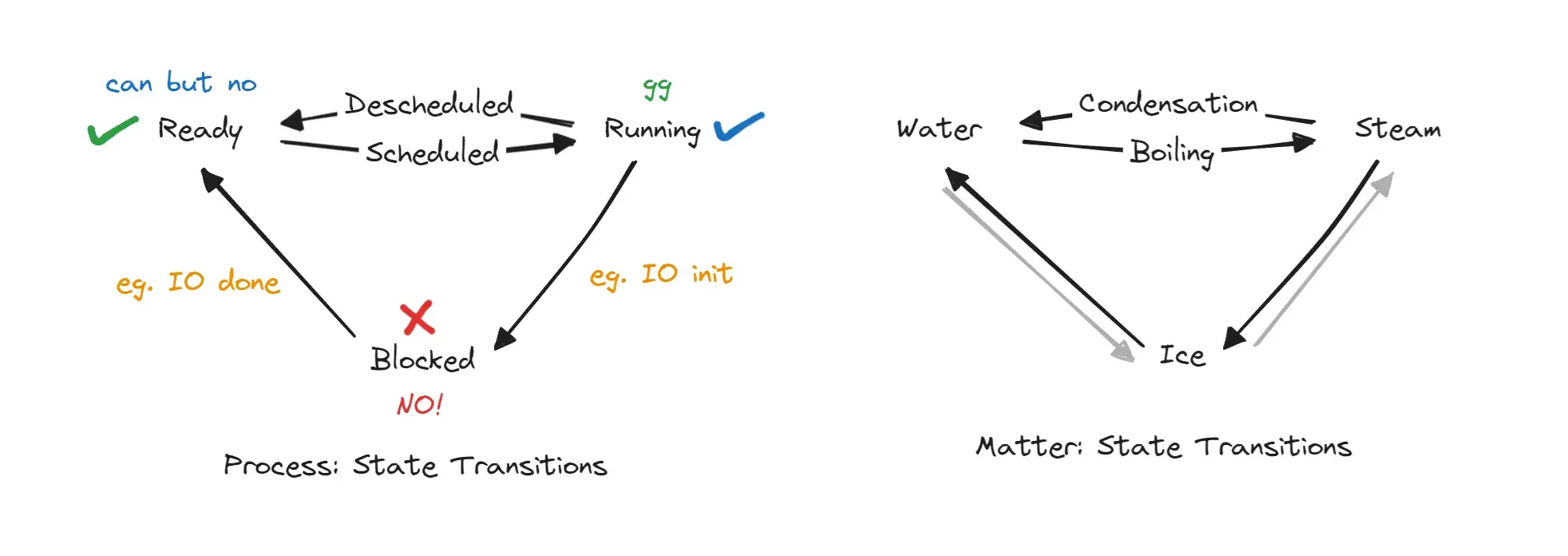
There are three states of matter (no plasma, no BEC) and there are three states of process.
ds(not a)
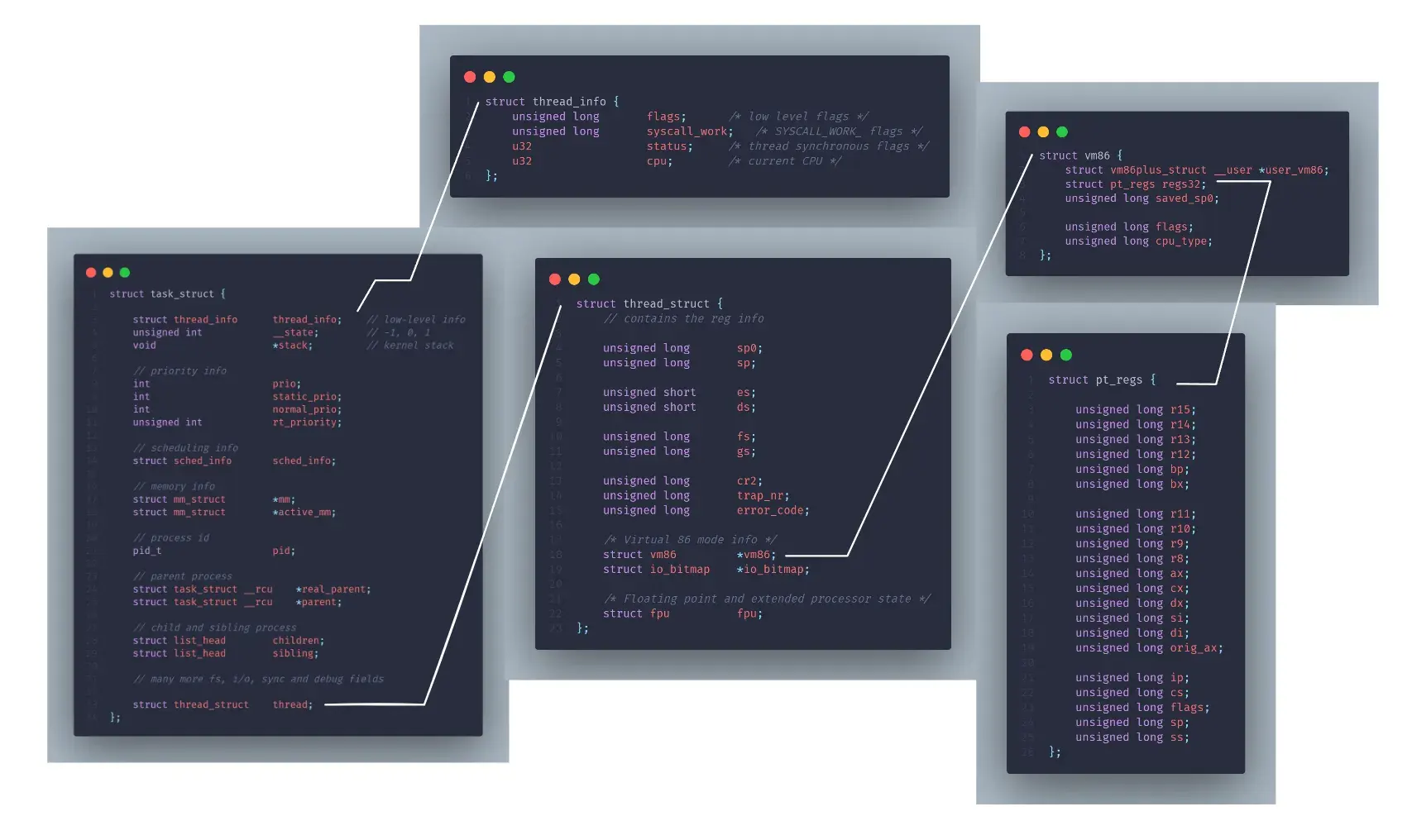
So to track each process, our OS does something similar to the struct-inside-struct code we saw earlier. It has a process list and in-turn for each process, it keeps note of the memory, stack, PID, parent process, register context, files open, current state etc. One of such DS looks like the following from here (with a lot of stuff trimmed), fancily called a PCB (process control/context block).
struct task_struct {

	struct thread_info		thread_info;	// low-level info
	unsigned int			__state;			// task state
	void					*stack;				// kernel stack

	// priority info
	int						prio;
	int						static_prio;
	int						normal_prio;
	unsigned int			rt_priority;

	// scheduling info
	struct sched_info		sched_info;

	// memory info
	struct mm_struct		*mm;
	struct mm_struct		*active_mm;

	// process id
	pid_t					pid;

	// parent process
	struct task_struct __rcu	*real_parent;
	struct task_struct __rcu	*parent;

	// child and sibling process
	struct list_head		children;
	struct list_head		sibling;

	// many more fs, i/o, sync and debug fields

	struct thread_struct	thread;
};
For x86 systems, the task_struct and other structs are as follows. From the thread_info.h, processor.h, vm86.h and ptrace.h files from the linux kernel source at arch/x86/include/asm/
Okay, we have 5 states of matter, so does a process, or maybe more, :)
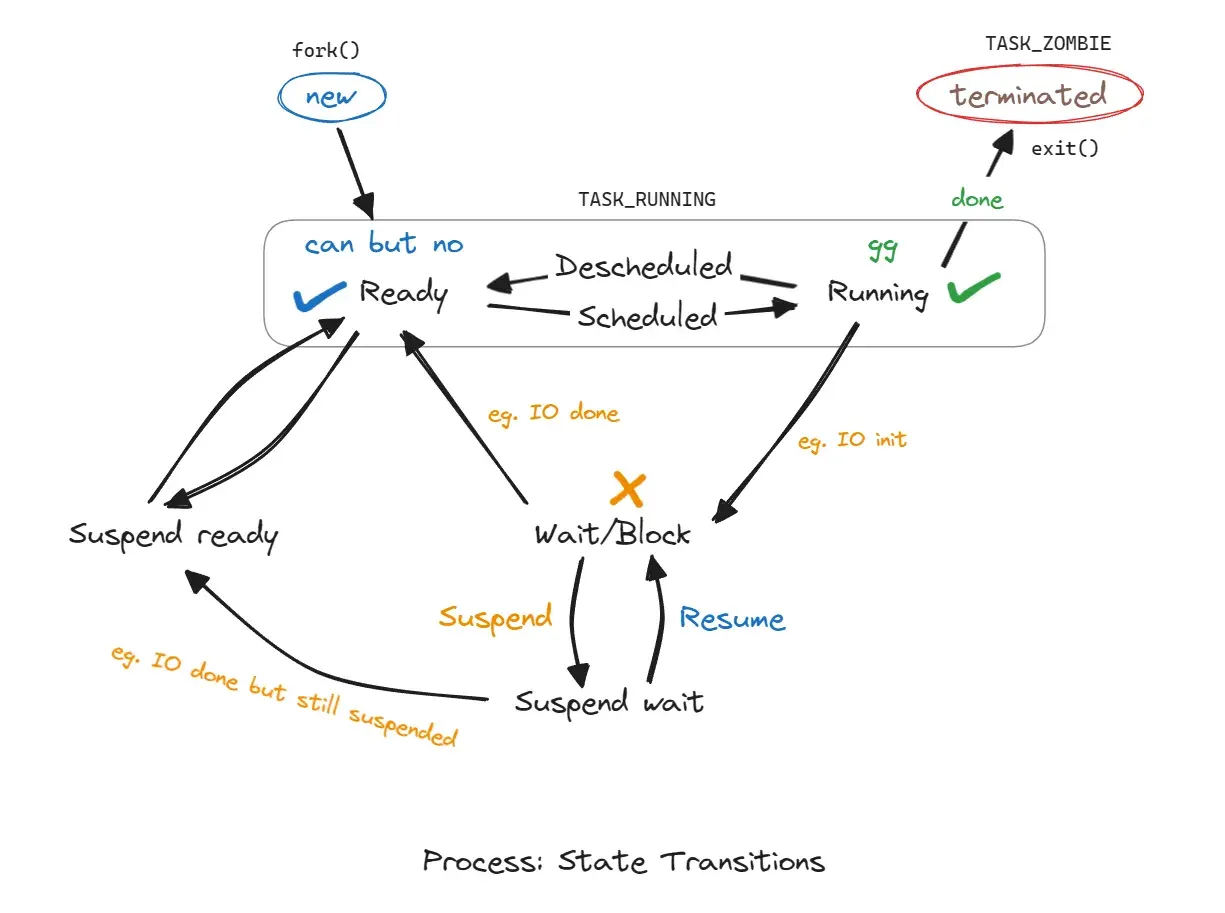
We’ll visit these states later especially the TASK_ZOMBIE one!
28th May 2024, 12:51 PMprocess creation
Running a quick ps -eaf shows the list of all processes running on the system. You get an output like the following.
UID          PID    PPID  C STIME TTY          TIME CMD
root           1       0  2 12:15 ?        00:00:32 /sbin/init splash
root           2       0  0 12:15 ?        00:00:00 [kthreadd]
...
So the init process and kthreadd (kernel thread daemon), daemon=bg process, are the first processes to run. Both are the children with PPID as 0.
Now, let’s write up a program to create a new process!
#include<stdio.h>
#include<stdlib.h>
#include<unistd.h>
#include<sys/types.h> // for using pid_t

int main() {
	pid_t pid; 	// internally, a signed int;
    printf("No fork yet!\n");
    pid = fork();
    printf("Forked!\n");

	if(pid < 0) {
		fprintf(stderr, "Fork failed\n");
		exit(-1);
	}
	else if(pid == 0) {
		printf("I am the child process with pid : %d\n", getpid());
	}
	else {
		printf("I am the parent (%d) process of %d\n", getpid(), pid);
	}
	return 0;
}
On running this program, the output will be something like the following.
No fork yet!
Forked!
I am the parent (2406) process of 2407
Forked!
I am the child process with pid : 2407
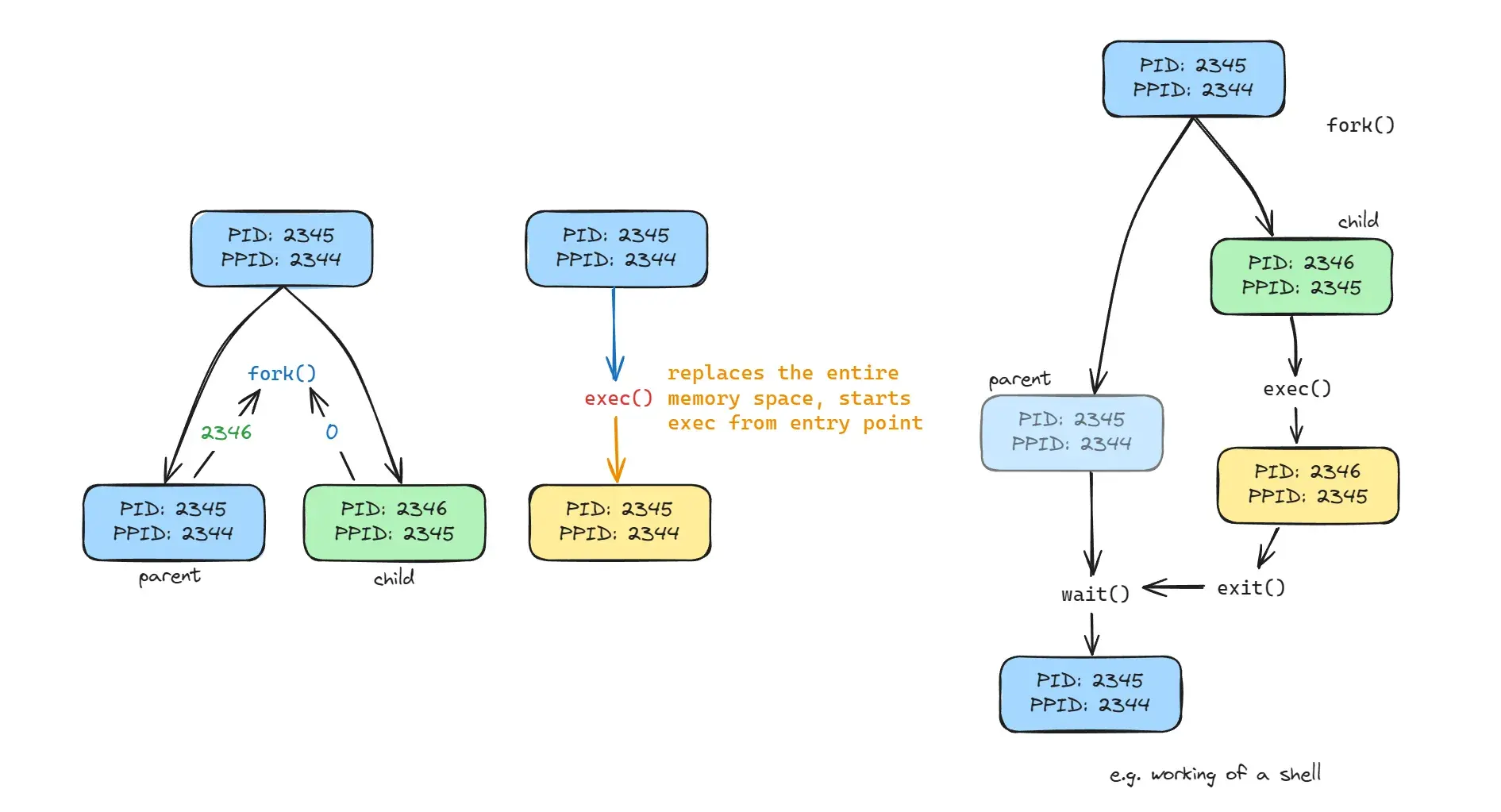
So, what’s happening is the fork() system call? It creates a new process, the child process is an almost exact copy (remember the copy-on-write mechanism?), but it starts executing from the point where fork() was called. In the parent process, the return value of fork() is the PID of the child process, and in the child process, the return value is 0.
frprintf
fprintf is somewhat similar like printf but can print to files. Interestingly, stdin, stdout and stderr are also files for Linux with file descriptors 0, 1 and 2 respectively.
Also, the above output is not deterministic. Sometimes the child process runs first, sometimes the parent. This is because the OS scheduler is free to choose which process to run first. Can we control this? Yes, we can, by using the wait() system call, a minor modification in the above program.
// include stdio, stdlib, unistd, types
#include<sys/wait.h> // include this two for the wait() system call

	// rest same

	}
	else {
		int x = wait(NULL); // NULL is for status, we don't care about it
		printf("I am the parent (%d) process of %d\n", getpid(), pid);
	}
	return 0;
}
Expectedly, the output will be as follows.
No fork yet!
Forked!
Forked!
I am the child process with pid : 2477
I am the parent (2476) process of 2477
Turns out we can also create a new process using the exec() system call. This is exactly how the shell functions. It calls a fork() and then exec() the required program. The exec() replaces the forked process with the new process, and the parent process (shell) waits for the child process to finish.
There’s a lot to read about exec() especially at man exec. A quick example of using exec() is as follows. (There’s actually a lot of exec() functions, execv, execvp, execl, execlp, execle, execve, execvpe etc etc)
// similar to our programs above, in the child process
char *args[] = {"/bin/ls", "-l", NULL};
execv(args[0], args);

// stuff below this part will not be executed at all
Just creating a process isn’t enough, we (or the OS) need/s to interact with it. For the same reason, we have a signal subsystem. Signals are a way to notify a process that some event has occurred. For instance, SIGKILL is a signal to kill a process, SIGSTOP to stop a process, SIGCONT to continue a stopped process etc.
Remeber the Ctrl + C and Ctrl + Z commands? They send signals to the process. The SIGINT signal is sent when Ctrl + C is pressed, and the SIGTSTP signal is sent when Ctrl + Z is pressed.
A quick recap!
That’s it for process and process api! Next, we’ll look up how is the stuff controlled (starting with LDE).
2nd June 2024, 15:02direct execution
So in direct execution, OS just sets up the process and then it (process) is on its own and runs natively on the CPU without any intervention from the OS. OS just waits… and waits… and waits… until the process is done.

But, should we trust the process? ironically, no. The process can be malicious, or it can be buggy, or it can be just a bad process. So, the OS needs to keep an eye on the process. It does so by using the trap mechanism. LDE kicks in here.
LDE
To keep from the process taking all over the CPU, we have two kinds of privileges, user and kernel. The user process runs in user mode, and the kernel runs in kernel mode. So, while running, an app generally doesn’t have access to entire hardware, but it can ask the OS to do stuff for it.
We are familiar with the syscall mechanism, right? It is a way for the user process to ask the OS to do stuff for it. To execute a syscall, a special trap instruction is executed by the program. When the user process executes a syscall instruction, the CPU switches to kernel mode, and the OS takes control. The OS then does the stuff and returns back to the user process via return-from-trap instruction.
4th June 2024, 20:23But before executing the trap, hardware needs to ensure it has all the current state saved, so as to return safely and continue. Thus, the registers and flags are saved on the kernel stack (specific to a process), and then retrived later.
Okay, so we called a trap instruction, but what to do? which code is to be run? The OS maintains a trap table which has the address of the code to be run for each trap. The trap table is set up by the OS during boot time. Also, you need to call a syscall by its number, and not by its name. The syscall number is a unique identifier for each syscall. This is all done in the privileged mode, so the user process can’t mess with it. (Trap tables stay until you reboot the system).
7th June, 2024 08:57Switching between different processes
So, we have multiple processes running on the system, and the OS needs to switch between them. This is done by the context-switch mechanism. The context-switch is the process of saving the current state of the running process and loading the state of the next process to run. The context-switch is done by the OS, and the user process doesn’t know about it.
But, if a process is currently running on CPU, technically OS is not running, right? So, how does the OS do the context-switch? There are multiple ways; Either it is like we saw earlier,
- OS waits for the process to hand control over to it, or
- the OS is given control when a
syscallis executed. - There’s a third way, the
interruptmechanism.
So, interrupts are signals; These signals can be of two types, hardware and software. The hardware interrupts are sent by the hardware devices, like a timer interrupt, a disk interrupt etc. The software interrupts are sent by the software, like a syscall interrupt.
When an interrupt is received, the CPU stops the current process, saves its state, and then jumps to the interrupt handler. The interrupt handler is a piece of code that is run when an interrupt is received. The interrupt handler then does the stuff and returns back to the process. Hardware is responsible for the proper saving and restoring of the state.
So, we (the OS) have the control now. The decision-maker is the scheduler, that decides which process to run next. It can be of different types, like round-robin, priority-based, shortest-job-first etc. The scheduler is responsible for the context-switch as well.
but what happens in a switch?
- Trap table initialized by OS, Interrupt timer started by hardware
- Process is running, an interrupt is received
- Save the current state of the running process (registers, flags etc to the kernel stack)
jumpto trap handlerswitch()(save registers to the process struct,task_structremember? , )return-from-trapinto the new process- Load the state of the next process to run (registers, flags etc from the kernel stack)
- Update the
PC(program counter) to the new process - Run the new process
- Repeat
Read swtich from linux kernel source here
but if another interrupt comes in?
(ignore). :) Pretty bad idea tbh but yeah, a way. There are certain locking mechanisms to prevent this, like spinlocks, semaphores, mutexes etc.