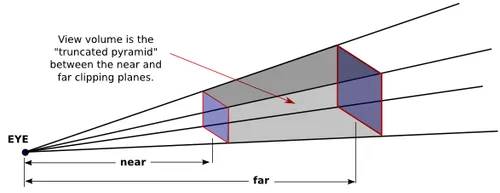
Viewport
What is a Viewport?
A viewport refers to the visible area through which content is displayed. For a Graphics/UI designer, a viewport is the visible part of the canvas on which he can perform his methods and manipulate colors and texts to visually express his art. In this project we can use the words graphic and art synonymously. We divide the graphic into simpler to manage UI elements and work on them one at a time. These elements come together simultaneously to give the illusion to the viewer of a time varying graphic.
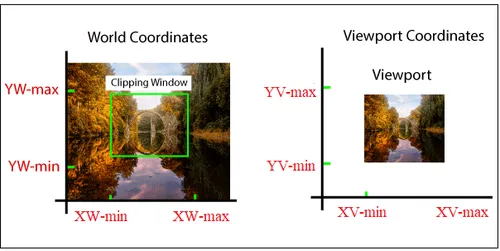
When we create a Graphic/UI not all of it will be visible to the user, a clipped portion will only be visible.
When playing a multiplayer game there is a common map or physical environment available to the users. Assuming the environment is large enough to not all get rendered on a single screen, the user is free to access any part of the environment but at a time only a small clipped portion of it can be seen by the user. Similarly, different players can play in the same environment but will see only the clipped portion their vision allows them to see. See the below image:
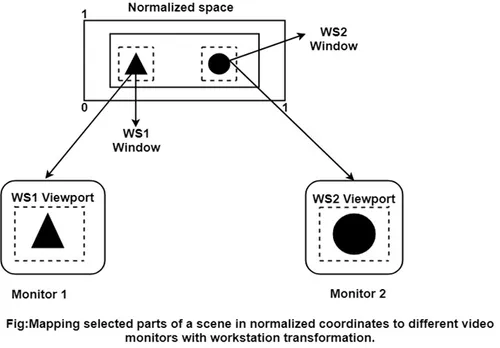
The space or the canvas where we make the graphic ui is called the Normalised Space while the clipped portion on the screen is called the window viewport.
Viewport Designing
A Viewport will show all your UI elements on the screen and making sure that we place our elements at the correct positions, makes it necessary to name the points on the viewport. What is a better way for naming than to set up axes on the canvas. A coordinate plane will enable us to pinpoint exact locations as well as provide quick viewport view changes when we try to navigate across the canvas with the help of Coordinate plane transformations such as translation, rotation, scaling etc. This is called Viewport Designing.
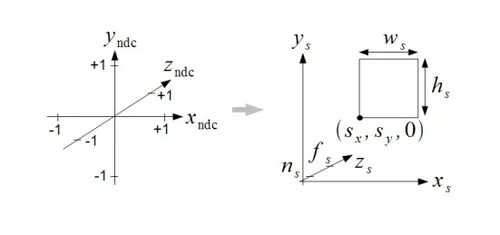
We have set up 3d axes in the normalised space Ns and then set up square 2d axes to setup our screen. Remember that our screen is a simple plane (we will work on plane devices, curved amoled displays is a topic very far). Viewports can be setup in a lot of unique ways, mainly seen in game development, translation is usually sufficient in web development. Some of the methods are:
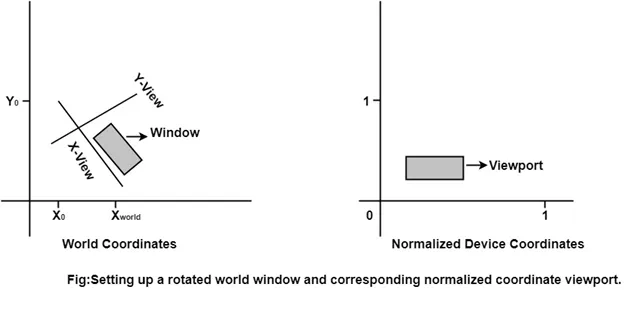
- Rotated Viewport
- Projection of 3D Objects